Building an AI agent that works in a demo can take an afternoon. A model, a prompt and a couple of tools are enough to show something impressive. Running agents in production is a different problem. Each agent needs an identity, controlled access to tools and data, memory that can be audited and enough visibility to explain what it did and why. These requirements are where most agent projects slow down.
This article explains the building blocks AWS provides for these problems: the Strands Agents SDK for defining agents and Amazon Bedrock AgentCore for running them. It shows how they fit together, walks through a short code example and a request from start to finish, and suggests a practical order for adoption.
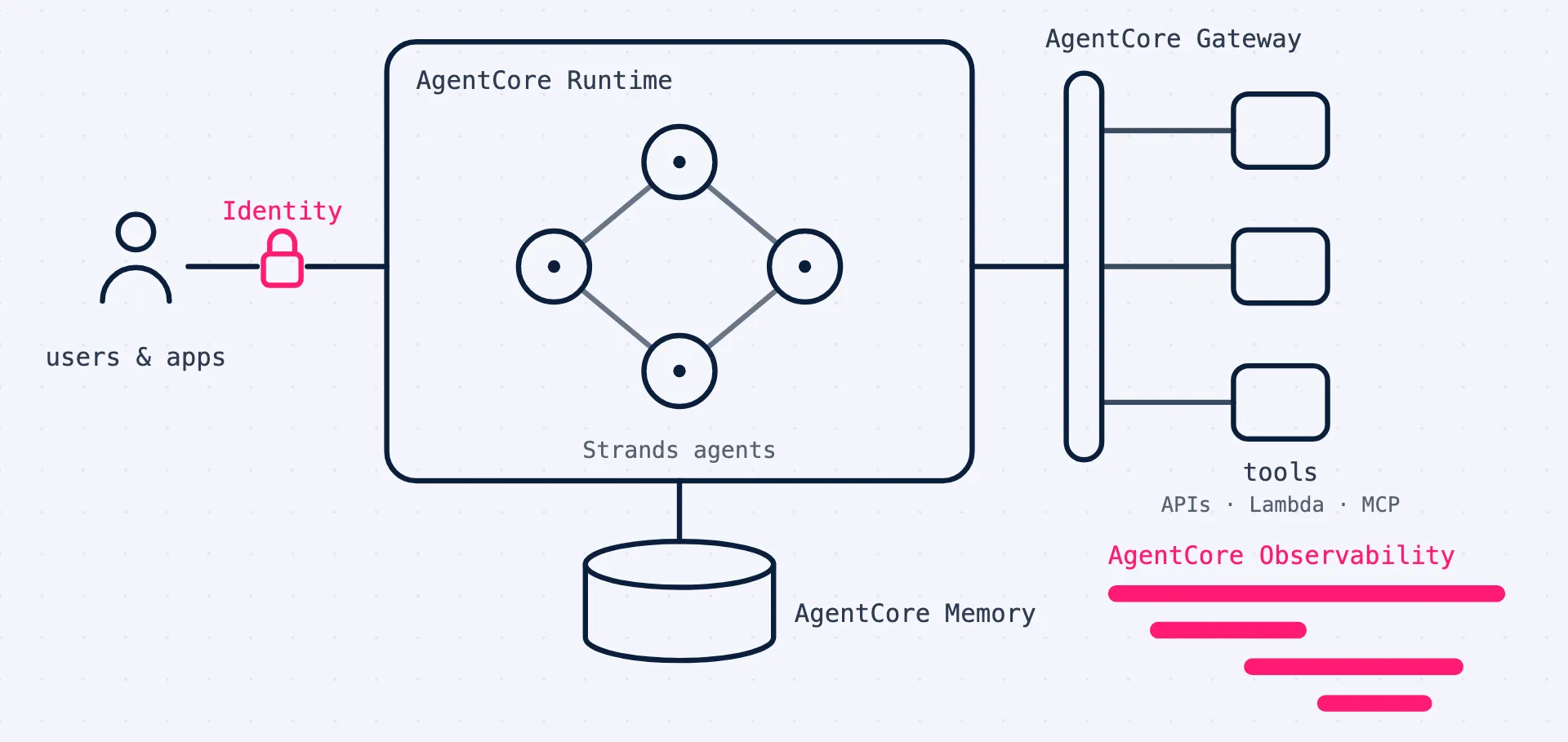
In short: Use an agent framework such as Strands Agents to define what the agent does, and Amazon Bedrock AgentCore to run it safely: Runtime hosts it, Identity handles who it acts for, Gateway controls which tools it can call, Memory stores context and Observability traces every step. Start with read-only tools and add actions, memory and policies step by step.
What changes when an agent goes to production
An agent is a model in a loop. It reads a request, decides which tool to call, looks at the result and repeats until it has an answer. In a demo, the loop runs with the developer’s credentials, on the developer’s laptop, with nobody watching. In production, every part of that loop raises a question.
Who is the agent acting for? It must reach systems with the permissions of a specific user or service, not with a shared administrator key. Otherwise any user can do through the agent what they could never do directly.
What may it do? Tools that change data need much tighter control than tools that only read. The limits should be enforced outside the model, because a model can be persuaded to ignore instructions.
What does it remember? Conversation history and learned preferences are data, with retention, privacy and access requirements like any other data.
What did it do, and why? When an answer is wrong or an action goes badly, you need to see the model calls, tool calls and results that led to it.
How is it isolated? Sessions from different users must not be able to see each other’s data, even when they run the same agent at the same time.
Strands Agents: defining the agent
Strands Agents is an open-source SDK from AWS for building agents. You define a model, a system prompt and a set of tools, and the SDK runs the reasoning loop, letting the model decide which tools to call and in which order. It works with models on Amazon Bedrock and from other providers, supports patterns where several agents work together, and emits OpenTelemetry traces. Strands is not required for AgentCore, which also runs agents built with other frameworks such as LangGraph or CrewAI, but the two are designed to work well together.
Here is a small but complete example: a support agent with one read-only tool, wrapped so that it can run in AgentCore Runtime.
from bedrock_agentcore.runtime import BedrockAgentCoreApp
from strands import Agent, tool

app = BedrockAgentCoreApp()

@tool
def get_order_status(order_id: str) -> str:
    """Return the current status of an order."""
    return lookup_order_status(order_id)  # your read-only order API

agent = Agent(
    system_prompt=(
        "You help support staff answer questions about orders. "
        "You can look up orders, but you never change them."
    ),
    tools=[get_order_status],
)

@app.entrypoint
def invoke(payload):
    result = agent(payload.get("prompt"))
    return {"result": result.message}

if __name__ == "__main__":
    app.run()
The @tool decorator turns an ordinary function into a tool the model can call; the docstring tells the model what the tool is for. The system prompt describes the agent’s job, but notice that the safety property that matters, never changing orders, is also guaranteed by the fact that the only tool available is read-only. The BedrockAgentCoreApp wrapper exposes the agent as an endpoint that AgentCore Runtime can host. In a larger setup, tools would typically come from AgentCore Gateway rather than being defined in the agent’s own code.
Amazon Bedrock AgentCore: running the agent
AgentCore is a set of managed services for operating agents. They can be used together or individually, so you can adopt them gradually.
Runtime
Runtime hosts the agent and exposes it as an endpoint; this is where requests from users and applications arrive. Each session runs in its own isolated environment, which keeps users’ data apart, and sessions can support long-running tasks rather than only short request and response cycles.
Identity
Identity handles authentication in both directions. Inbound, it verifies the user or application calling the agent through your existing identity provider. Outbound, it manages the credentials the agent needs to call other services on the user’s behalf, such as OAuth tokens or API keys, so they never have to be hard-coded in agent code or configuration.
Gateway
Gateway connects agents to tools. It turns existing APIs and AWS Lambda functions into tools the agent can call through the Model Context Protocol (MCP), and applies authentication to those calls. Tools are registered once and shared, instead of every agent integrating with every system on its own. Gateway is about traffic from agents to tools; it is not the entry point for user requests, which arrive at Runtime.
Memory
Memory stores short-term context within a session and long-term memory across sessions, such as facts and preferences extracted from earlier conversations. Because memory is a managed service rather than a database each team builds on its own, retention and access can be controlled in one place.
Observability
Observability collects traces, metrics and logs for agent sessions, including every model call and tool call, and shows them in Amazon CloudWatch. It is based on OpenTelemetry, so the same data can also be sent to other monitoring tools your teams already use.
Policy, Evaluations and built-in tools
AgentCore Policy checks tool calls at the gateway against rules written in Cedar, AWS’s open-source policy language, so limits on what an agent may do are enforced outside the agent’s own reasoning. AgentCore Evaluations scores agent behavior from traces, which helps detect quality changes over time. AgentCore also offers a managed Code Interpreter and Browser tool for agents that need to run code or use websites.
Key idea: A prompt is not a permission. Anything an agent must never do should be impossible, through scoped tools, credentials and policies, not merely discouraged in its instructions.
Following one request through the system
Suppose a support employee asks the agent from the example above: “Where is order 4711, and has the customer contacted us about it before?”.
The request arrives at the agent’s endpoint in AgentCore Runtime, which starts or resumes an isolated session for this user. AgentCore Identity has already verified, through the company’s identity provider, that the caller is a support employee.
The Strands agent sends the question to a model on Amazon Bedrock, which decides to call the order status tool. The tool call goes through AgentCore Gateway, which checks that this agent may use this tool and, if policies are configured, that the call is within the rules. Gateway calls the order API with credentials provided by AgentCore Identity, so the agent itself never holds them.
To answer the second half of the question, the agent reads earlier interactions about this customer from AgentCore Memory. It combines both results into an answer and stores a summary of the exchange back in memory, according to the retention rules you configured.
Throughout, AgentCore Observability records a trace: the model calls, the tool call and its result, the memory reads and writes, and how long each step took. If the answer turns out to be wrong, someone can look at the trace and see whether the problem was the model’s reasoning, the data returned by the tool or the context retrieved from memory.
When not to use an agent
Agents are powerful because the model decides what to do next. That is also what makes them harder to test and audit. If you can draw the process as a fixed flowchart, with the same steps in the same order every time, you probably do not need an agent. A workflow in AWS Step Functions that calls a model at specific steps, for example to classify a document or draft a reply, is simpler to test, cheaper to run and easier to explain. Agents earn their complexity when the path genuinely depends on what the model finds along the way.
A practical adoption path
Start with one agent and read-only tools. Choose a task where the agent gathers and summarizes information for a person who makes the decision, so mistakes are cheap and easy to notice.
Turn on observability from day one. Traces show what the agent actually does, which is often different from what its designers expected. They are also the only practical way to debug it.
Register tools through the gateway. Even with a single agent, defining tools centrally avoids hard-coded credentials and makes the second agent much cheaper to build.
Add write actions with approval. When the agent needs to change data, require a person to confirm each action at first, and add policies that limit which actions are allowed and on which records.
Introduce memory deliberately. Decide what should be remembered, for how long and who can see it before enabling long-term memory. It is much easier to add memory later than to remove data you should not have kept.
Build an evaluation set. Collect real requests with expected outcomes and run them whenever you change the model, the prompt or the tools, so improvements in one area do not quietly break another.
Common mistakes to avoid
A few mistakes come up again and again in agent projects. Giving the agent a broad IAM role “to get started” and never narrowing it. Calling internal APIs directly from agent code with stored credentials. Treating the system prompt as the main safety mechanism. Storing conversation history without a retention rule. And launching without traces, then trying to reconstruct what happened after an incident. Each of them is easy to avoid at the start and expensive to fix later.
Try this: Take one agent idea your organization is discussing and list every tool it would need. Mark each tool as read or write, note which data it touches and who would approve its actions. If the list contains write tools without an approver, you have found the first design decision to make.
Key takeaways
- Production agents need identity, controlled tool access, governed memory and tracing, not only a good model.
- Strands Agents defines the agent; Amazon Bedrock AgentCore runs, connects and controls it.
- Requests arrive at Runtime and are authenticated by Identity; Gateway handles traffic from agents to tools.
- Use agents where the path depends on the model’s findings, start read-only with tracing on, and add actions, memory and policies step by step.
Planning to move agents from prototype to production on AWS? We help design the architecture, security model and observability for AgentCore and Strands, and build the first agents together with your team.
Talk to us